JSON serialization using Codable Swift

We will use the sample json mentioned below to explain

Playground file is attached to test the below mentioned examples.

let urlString = "https://jsonplaceholder.typicode.com/todos/1"

{
  "userId": 1,
  "id": 1,
  "title": "delectus aut autem",
  "completed": false
}

Codable

What’s encoding and decoding in simple terms in the context.

  Decoding : We need to convert JSON response to the objects defined in our projectt

  Encoding : We need to convert our custom objects into JSON string to  post to a service.

JSON serialization before swift 4 :

 A verbose process , length depending on the size of the json structure.

let json = try? JSONSerialization.jsonObject(with: data, options: [])
if let data = json as? [String: Any] {
//This expands to every property in the struct
if let userId  = data[“userId”] as? Int {bookCatalog.userId = userId }
}

Starting Swift 4:

JSON  serialization encoding and decoding can be achieved with mere adopting to Codable protocol.

The Codable protocol is a composition of two protocols, Decodable and Encodable. 

Once can define the struct in the following ways depending on your use case

if you intend to decode and encode for your use case

  Struct BookCatalog :  Codable {…} 

You can also simply use if your use case is only to decode the response and use the data in your UI.

Struct BookCatalog :  Decodable {…} 

Decodable and Encodable protocols are adopted by the components that encode/decode various data formats, like JSON.

For our discussion we have 

The JSONDecoder and JSONEncoder classes use those the Decoder and Encoder protocols to provide the functionality to decode/encode JSON. 

Example to encode /decode using codable

struct BookCatalog: Codable {
    let userId: Int
    let id: Int
    let title: String
    let completed: Bool
    let test:String?
}

func fetchData() {
    if let url = URL(string: urlString) {
        let dataTask = URLSession.shared.dataTask(with: url) { data, response, error in
            if let jsonData = data {
                    let decoder = JSONDecoder()
                do {
		    //Below 1 line does the magic to convert json to required Objects when you are adopting to codable protocol
                    let catalog = try decoder.decode(BookCatalog.self, from: jsonData)
                    print(catalog.userId)
                    print(catalog.id)
                    print(catalog.title)
                    print(catalog.completed)
                    
                    let encoder = JSONEncoder()
                    do {
                        let encodedJson = try encoder.encode(catalog)
		    //Below 1 line does the magic to convert Object to JSON string when you are adopting to codable protocol
                        if let jsonString = String(data: encodedJson, encoding: .utf8) {
                            print(jsonString)
                        }
                    } catch {
                            print("Encode failed")
                        }
                } catch {
                    print("Decode failed")
                }
            }
        }
        dataTask.resume()
    }
}

Coding keys 

When do you need coding keys ??

If you want a custom name for your properties than what’s in json response .Every class or struct that conforms to Codable can declare a special nested enumeration called CodingKeys. You use it to define properties that should be encoded and decoded, including their names.

Below is the example to define your structure with coding keys.

struct BookCatalogKeys: Codable {
    let userIdentifier: Int
    let index: Int
    let title: String
    let completed: Bool
    
    enum CodingKeys: String, CodingKey {
        case userIdentifier = "userId"
        case index = "id"
        case title
        case completed
    }
}

Serialization code remains the same even though we change the property names using coding keys.

func fetchDataKeys() {
    if let url = URL(string: urlString) {
        let dataTask = URLSession.shared.dataTask(with: url) { data, response, error in
            if let jsonData = data {
                    let decoder = JSONDecoder()
                do {
                    let catalog = try decoder.decode(BookCatalogKeys.self, from: jsonData)
                    print(catalog.userIdentifier)
                    print(catalog.index)
                    print(catalog.title)
                    print(catalog.completed)
                    
                    let encoder = JSONEncoder()
                    do {
                        let encodedJson = try encoder.encode(catalog)
                        if let jsonString = String(data: encodedJson, encoding: .utf8) {
                            print(jsonString)
                        }
                    } catch {
                            print("Encode failed")
                        }
                } catch {
                    print("Decode failed")
                }
            }
        }
        dataTask.resume()
    }
}

What’s if a key value pair in nil

If your json response doesn’t always send all the key value pairs, you can define your property as optional to avoid decode failures. Example code below

struct BookCatalog: Codable {
    let userId: Int
    let id: Int
    let title: String
    let completed: Bool //
    let test:String? // you can make this non optional to see the decoder fail as this “test” key value pair is not available in the response.
}

What’s if we don’t need all the values from the json

you can always define a smaller structure as needed. The below code would work just fine.

struct BookCatalog: Codable {
    let userId: Int
    let id: Int
}
Access specifiers across dynamic frameworks and apps – Swift iOS

Access control defines how to allow access to parts of your code from code in other files and modules/frameworks. This feature enables you to hide the implementation details of your code, and to specify a preferred interface through which that code can be accessed and used.You can assign specific access levels to individual types like classes, properties, methods, initializers, etc. Swift provide default code protection for code within your framework. Here in this article we can discuss briefly on the scope of these access specifiers.


Swift provides 5 access specifiers to protect and share the functionality of your Frameworks/public SDK to vendors or within the company apps.
I have shared a client app and framework project – “accessspecifiers-1” below depicting the usage of access controls and can be used to play around with access specifiers for more understanding.

Let’s discuss the specifiers in the ascending order of protection.

Open
Open is used in modules/frameworks where a class is defined with a purpose for others to subclass and override. Most commonly used when you define a base class which handles provides default functionalities that other subclasses can use.
You can think UIViewController is Open class which we use to subclass all the view controllers. All the lifecycle methods like viewwillappear , viewdidappear are all open methods which has default behaviors and can also be overridden.

open class OpenClass: NSObject {
  open func testOpenAccess() {
  }
}

Public
Public classes/methods are used to share functionality across modules/Frameworks but public classes cannot be subclassed outside of the framework/module the class is defined.

public class PublicClass: NSObject {
   public func testPublicAccess() {
       print("PublicClass - testPublicAccess")
   }
}

Internal – Default access specifier
Internal is the access specifier provided by swift if there is none specified explicitly. All the internal classes are available to subclass/access within the framework/module.
Internal classes cannot be accessed outside the framework/module.

FilePrivate
This access specifier is restricted the file within your framework/Module. The same cannot be accessed outside of the file.

Private
This access specifier is restricted to the scope defined file n a framework/module.
Simple code snippet depicting the access specifiers.

//Class can be access only within framework
class OtherAccessClass: NSObject {
    func testInternalAccess() {
           print(" InternalClass - \(String(describing: self))")
        testPrivateAccess()
        testFilePrivateAccess()
    }
    
    //Can be access within the scope enclosed
    private func testPrivateAccess() {
        print(" testPrivateAccess - \(String(describing: self))")
        testInternalAccess()
        testFilePrivateAccess()
    }
}

//Can be accessed within the file enclosed
fileprivate func testFilePrivateAccess() {
      print(" testFilePrivateAccess")
}

Bonus tip:
Protected – There is no Access specifier “protected” in swift language. Apple considers any protected method or class falls under 2 categories(private/Internal) in swift iOS world.

iOS Localization – Device specific, Width specific, Singular/plural strings

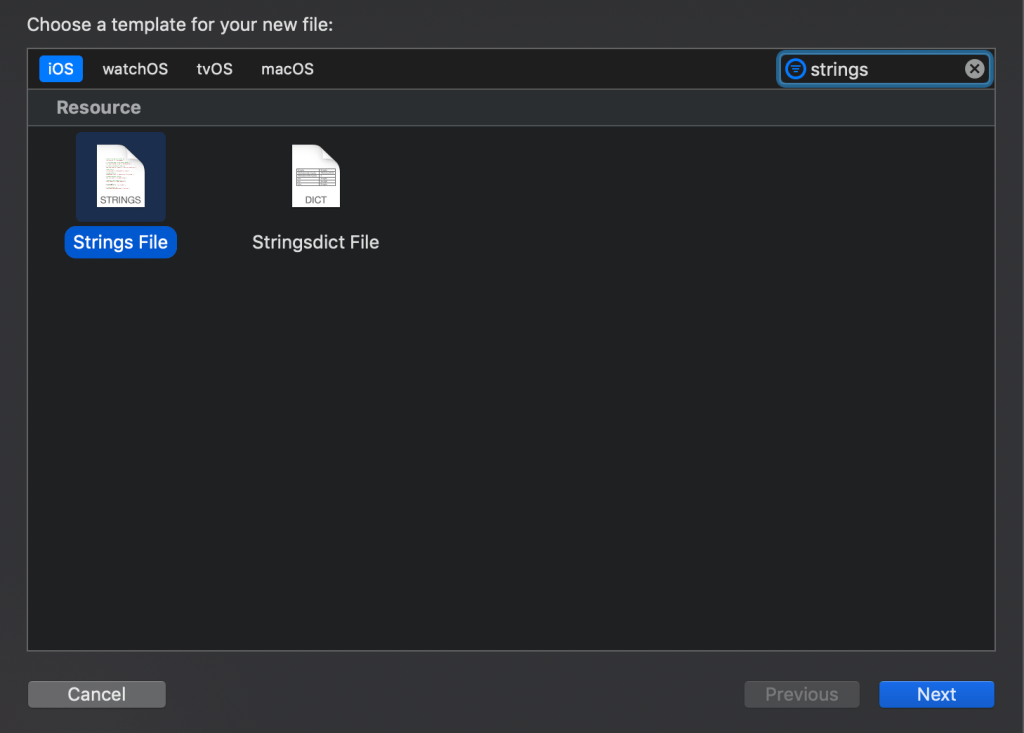
This is a quick write up on localization based on different scenarios we encounter in app development , how Stringsdict file is more advantageous in certain scenarios that plain strings file.This article assumes basic understanding of localization on iOS.

Scenario 1: What if I want to show different localization strings for singular and plural string

Using Localizable.Strings

ZERO_ITEMS_MESSAGE = “There are no items in the cart”;
SINGULAR_ITEM_MESSAGE = “There is 1 item in the cart”;
PLURAL_ITEMS_MESSAGE = “There are %u items in the cart”;

private func setSingularPluralLabels(numberOfItems: Int){
switch numberOfItems {
case 0:
singularPluralLabel.text = NSLocalizedString(“ZERO_ITEMS_MESSAGE”, comment: “”)
case 1:
singularPluralLabel.text = NSLocalizedString(“SINGULAR_ITEM_MESSAGE”, comment: “”)
default:
let formatString = NSLocalizedString(“PLURAL_ITEMS_MESSAGE”, comment:””)
singularPluralLabel.text = String.localizedStringWithFormat(formatString, numberOfItems)
}
}

Using Localizable.stringsdict – “items count” – NSStringPluralRuleType

private func setSingularPluralLabels(numberOfItems: Int){
let formatString : String = NSLocalizedString(“items count”, comment: “”)
let resultString1 : String = String.localizedStringWithFormat(formatString, numberOfItems)
singularPluralLabel.text = resultString1
}

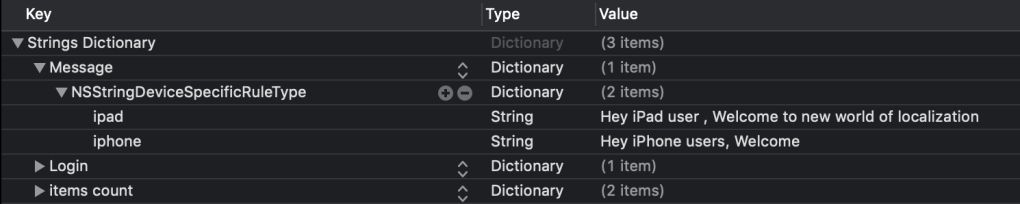
Scenario 2: What if I want to show different localization strings for different device types like iPhone/iPad

Using Localizable.Strings

iPHONE_TEXT = “Hey iPhone users, Welcome”;
iPAD_TEXT = “Hey iPad user , Welcome to new world of localization”;

In viewcontroller :

private func setDeviceSpecificLabels(){
switch UIDevice.current.userInterfaceIdiom {
case .pad:
deviceSpecificLabel.text = NSLocalizedString(“iPAD_TEXT”, comment: “”)
case .phone:
deviceSpecificLabel.text = NSLocalizedString(“iPHONE_TEXT”, comment: “”)
default: break;
}
}

Using Localizable.stringsdict – “Message” – NSStringDeviceSpecificRuleType

private func setDeviceSpecificLabels(){
deviceSpecificLabel.text = NSLocalizedString(“Message”, comment: “”)
}

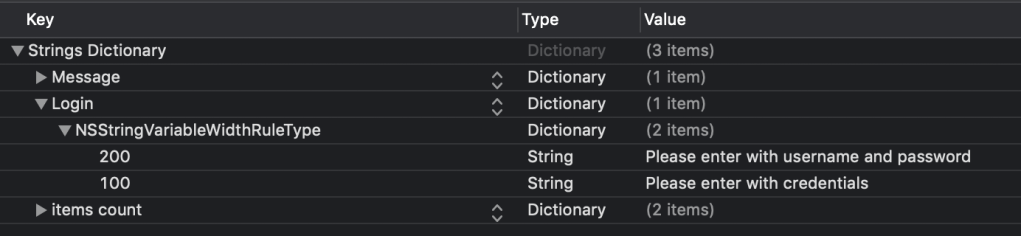
Scenario 3: What if I want to show different localization strings for different device sizes like iphone8/iphone 11 pro mac

Using Localizable.Strings

LOGIN_TEST_SMALL = “Please enter with credentials”;
LOGIN_TEST_LARGE = “Please enter with username and password”;

private func setWidthSpecificLabels(){
if (UIScreen.main.bounds.width == 375.0) {
widthSpecificLabel.text = NSLocalizedString(“LOGIN_TEST_SMALL”, comment: “”)
}
else {
widthSpecificLabel.text = NSLocalizedString(“LOGIN_TEST_LARGE”, comment: “”)
}
}

Using Localizable.stringsdict – “Login” – NSStringVariableWidthRuleType

private func setWidthSpecificLabels(){
let widthSpecificString = NSLocalizedString(“Login”, comment: “”) as NSString
widthSpecificLabel.text = widthSpecificString.variantFittingPresentationWidth(UIScreen.main.bounds.width == 375.0 ? 100 : 200)
}